Every retailer’s promotions, from plan to proof
Slotwise is trade promotion management for FMCG manufacturers and retailers. You see each promotion’s ROI change as you drag it, forecast with your own numbers or the built-in model, review every change before it lands, and check each promotion against what it actually sold.
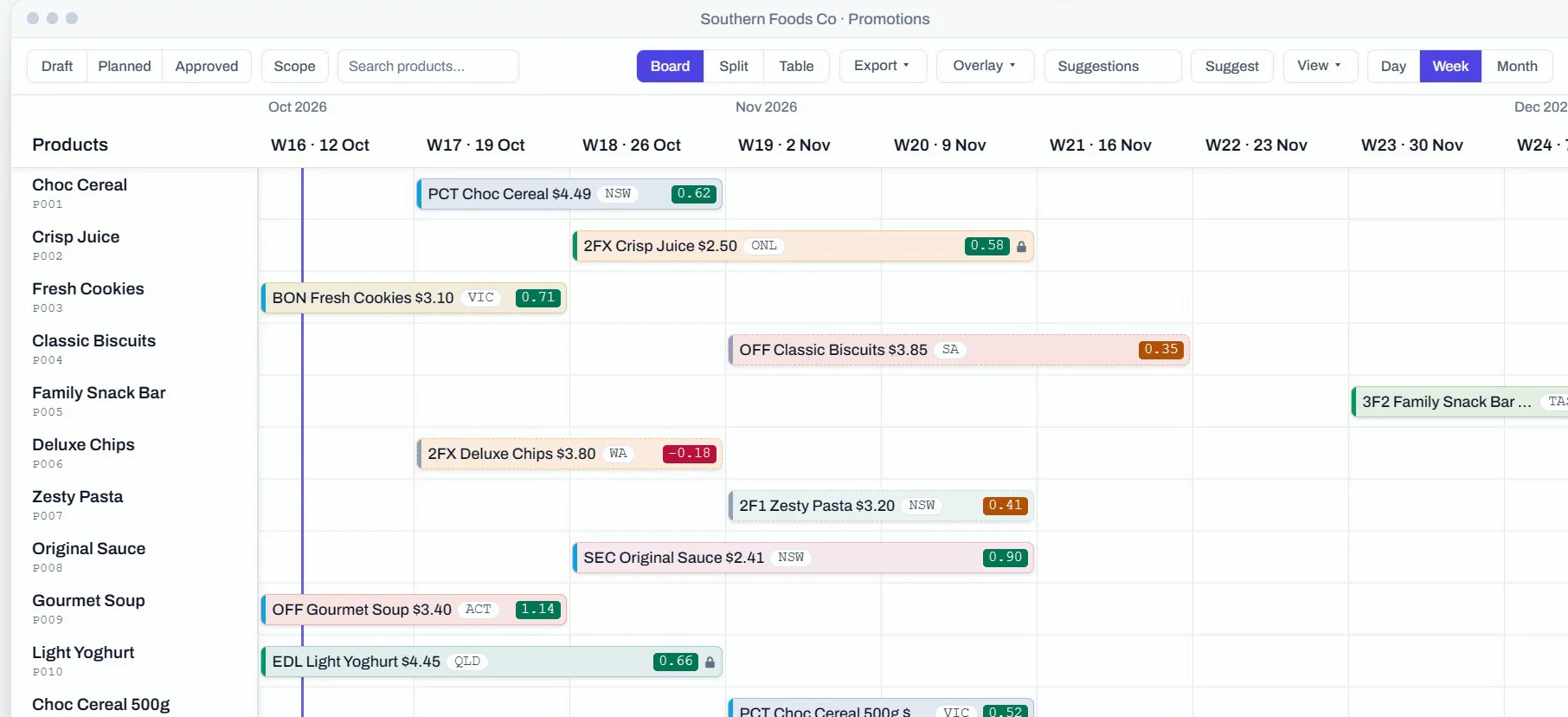
Built for both sides of the trade
More than half of everything bought at Coles and Woolworths is sold on promotion. Manufacturers plan those promotions account by account, and retailers plan them by banner, channel or format. Slotwise runs both on one board, with the same maths.
Source: ACCC Supermarkets Inquiry, final report, 2025.
Manufacturers
Plan every account on one board, with a view for each retailer. New promotions made in the Coles view start scoped to Coles, and promotions that apply to every retailer show in each view, marked All. Clash checks still run across your whole portfolio.
Retailers
Plan by banner, channel or store format instead of by account, on the same board with the same live economics. You can group rows by brand, category or product group to match how your buying teams work.
The brands behind our experience
The experience behind Slotwise wasn’t built at Slotwise. It comes from our founder’s work deploying trade promotion management with some of the best-known consumer brands and retailers in Australia, and Slotwise is built on the lessons from that work. These are some of the businesses behind our experience.







These names and logos belong to their owners. They show where our experience comes from, not a customer relationship or an endorsement of Slotwise.
What planning on one board does for your business
Trade spend is one of the largest costs your business carries, and every promotion decides where part of it goes. With the numbers in front of you while you plan, you can back the promotions that perform and rethink the ones that don’t. That means more margin for the business and a calmer week for the team planning it.
-
Know the numbers before you commit
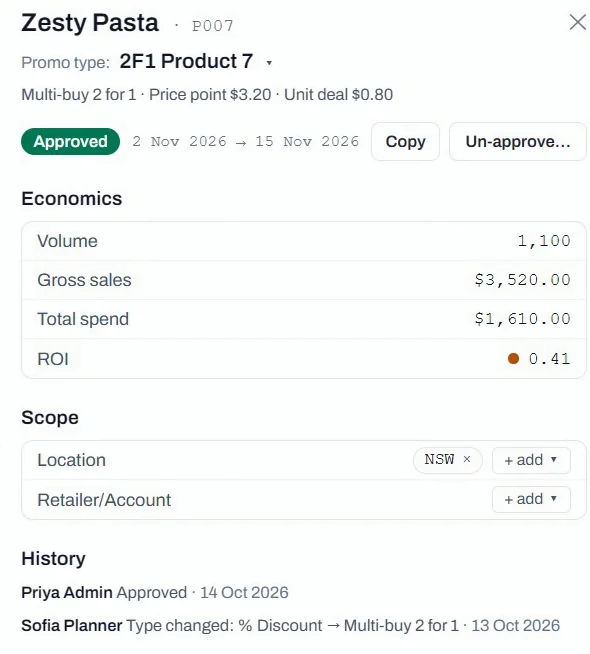
Every promotion shows its volume, spend and ROI while you plan it, and the figures update as you drag it to another week. You see what a promotion is likely to return before the spend is signed off, rather than after the invoices arrive.
-
Plan ahead with last year in view
Forecast each promotion from your own numbers or the built-in model, with last year’s promotions sitting right under this year’s. Clashes are flagged as soon as two promotions on the same product overlap, long before the catalogue goes to print.
-
See where the money is being lost
Promotions below your ROI target stand out while you plan. After they’ve run, you see the plan, the baseline and the actual side by side, so a promotion that sold little more than a normal week is easy to spot. Calibration then shows whether the forecast or the baseline was off.
-
AI that does the legwork while your team decides
Ask Claude which promotions miss your ROI target, or have it draft next month’s changes. Every proposal waits in the review tray, and nothing changes until someone on your team accepts it.
Every promotion follows the same loop and works from the same numbers. Each step below links to its part of this page.
How a promotion is built
A promotion is built in three layers, and each one hands its defaults to the next. You can edit any layer on its own, and on the promotion itself you can still override the prices, the unit deal and the volume, or add co-op.
Mechanic
The mechanic is the shape of the offer, such as 2 for $X, 3 for 2, dollars off or a percentage off. New workspaces start with eight classic mechanics, and you can edit them or add your own.
% Discount (PCT)
Promo type
A promo type prices a mechanic for a product or product group, either at a fixed price point or as a percentage off the list price, plus the unit deal. You can restrict it to the retailers that agreed its terms.
22% Off Family Snack Bar 250g · $3.12 · $0.42
Scheduled promotion
A scheduled promotion puts a promo type on real dates for one product or several, each with its own line of economics. Full price comes from each product’s list price on the start date. On Pro, each retailer can have its own price list, and a promotion running at several retailers is priced at each one’s own price, blended by expected volume.
Family Snack Bar 250g · Coles · 14–27 Sep 2026
Live ROI while you drag
Every promotion carries the same economics, worked out the same way wherever you see them. Drag a bar to new dates and the numbers recalculate before you let go, so you can compare weeks without leaving the board.
ROI is the margin earned on every promoted unit, including the ones you’d have sold anyway, for each dollar of trade spend; each organisation sets the target that turns it green.
Margin impact is the margin given up on the promoted units compared with full price, counting the price cut and the unit deal; it is negative for any discount, even when ROI is green.
On Pro, each retailer’s trade terms (on-invoice and off-invoice terms, rebates and freight) show as their own lines in the economics, so margin reads net of every term.
The board, the detail panel, the table, the export and the API all read the same numbers, so a figure never changes depending on where you look.
Forecast with your numbers or ours
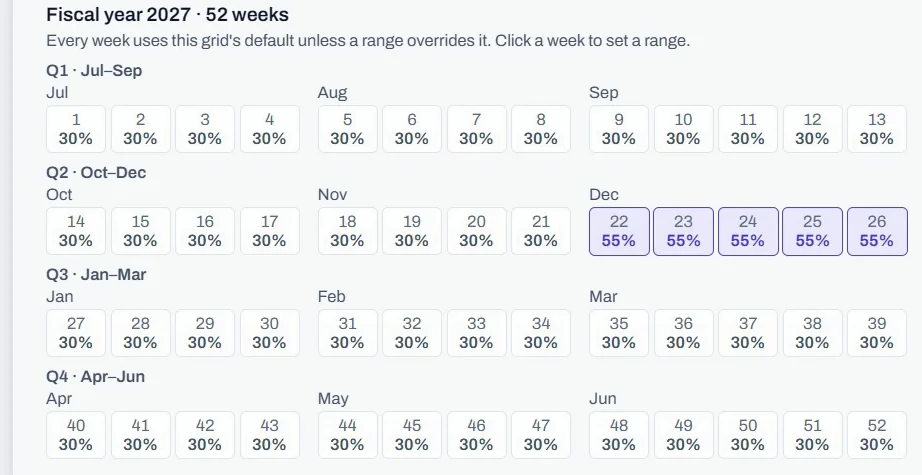
Load your own weekly forecast, or let Slotwise forecast each promotion from a baseline and an uplift. The baseline is what a product sells in a normal week, and the uplift is the extra a promotion adds. A product that normally sells 480 units, promoted with a 35% uplift, is forecast at 480 × (1 + 35%) = 648 units.
- Set an uplift for each promo type and fiscal week, then refine it for a product, a retailer or a run of weeks, like the December weeks raised to 55% here.
- Draft promotions re-forecast as you drag them, so their volume and ROI stay current.
- When a planned promotion drifts from the model, one click stages a Recalculate suggestion for someone to review and accept.
The built-in model comes with Pro and above, and you can import your own forecast on every plan. Compare plans
Review changes before they land
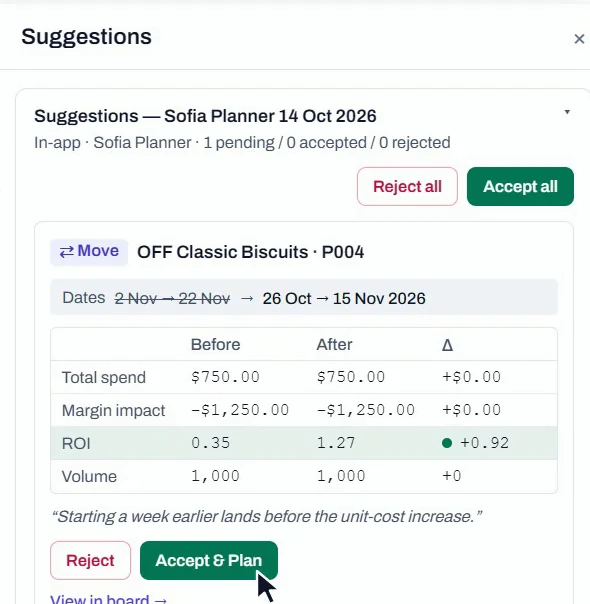
Switch on Suggestion Mode and your edits are staged for review instead of being applied. Proposals from an AI assistant land in the same tray, and every card shows the before, the after and the difference, so the reviewer sees exactly what a change is worth.
- Planners can accept a change into the plan, and approvers can accept and approve it in one step.
- Approvals and period locks are enforced in the database, not just on screen.
- Every status change, override and accepted suggestion is written to the audit trail.
Your AI proposes changes, and your team decides
Slotwise includes an MCP server, so Claude or another MCP-compatible assistant can read your live plan and draft changes the way a new planner would. Your team stays in charge of what actually changes.
AI assistance is included in Growth and above. How the AI connection works
-
Connect
Create a personal token, read-only or suggest, that carries your role and expires after 30, 90 or 365 days. If someone is moved to viewer, their AI loses write access straight away.
-
Ask
The assistant has 20 tools. Fifteen read your plan, forecasts, calibration and suggestion history, and five propose new promotions, edits, moves, removals and uplift-grid changes.
-
Decide
Proposals land in the review tray marked AI-assisted, and nothing changes until a person accepts one. An accepted change goes through the same locks, approvals and rules as a human edit.
Plan against actual, promotion by promotion
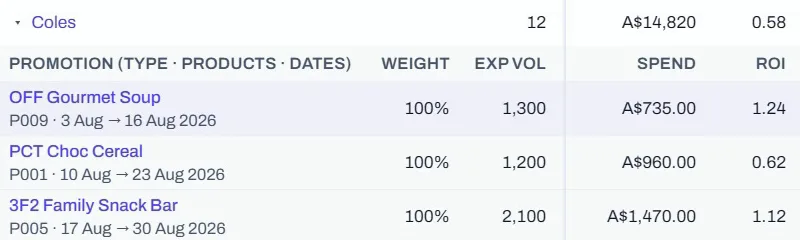
Record actual sales for each product, or let Slotwise allocate them from your weekly sell-out. Plan and actual then sit side by side on every promotion and roll up into the Performance Summary.
- Each promotion shows its actuals beside the plan, along with where they came from: recorded, or allocated from sell-out.
- The Performance Summary reports plan, baseline, actual and the difference by month and retailer, or by brand, category or product group, and you can open any row to see the promotions behind it.
- A three-sheet Excel export holds the summary, every promotion behind it and the method, so your finance team can re-derive the figures offline.
When a promotion ends, its forecast gets a score
Calibration scores each ended promotion’s forecast against what it actually sold, using the same baseline the model used. It tells two kinds of miss apart: an uplift the grid got wrong, and a baseline that was off to begin with.
- Scorecards spot patterns, such as a grid that ran about 19 points under forecast in 4 of its last 5 promotions.
- A review queue lists what to fix with one action each, and a heatmap lays out each promo type’s grids week by week.
- When a grid is well calibrated, you can copy its shape to other products or retailers.
Calibration comes with Pro and above, alongside the built-in model.
Last year’s promotions, on their own rows
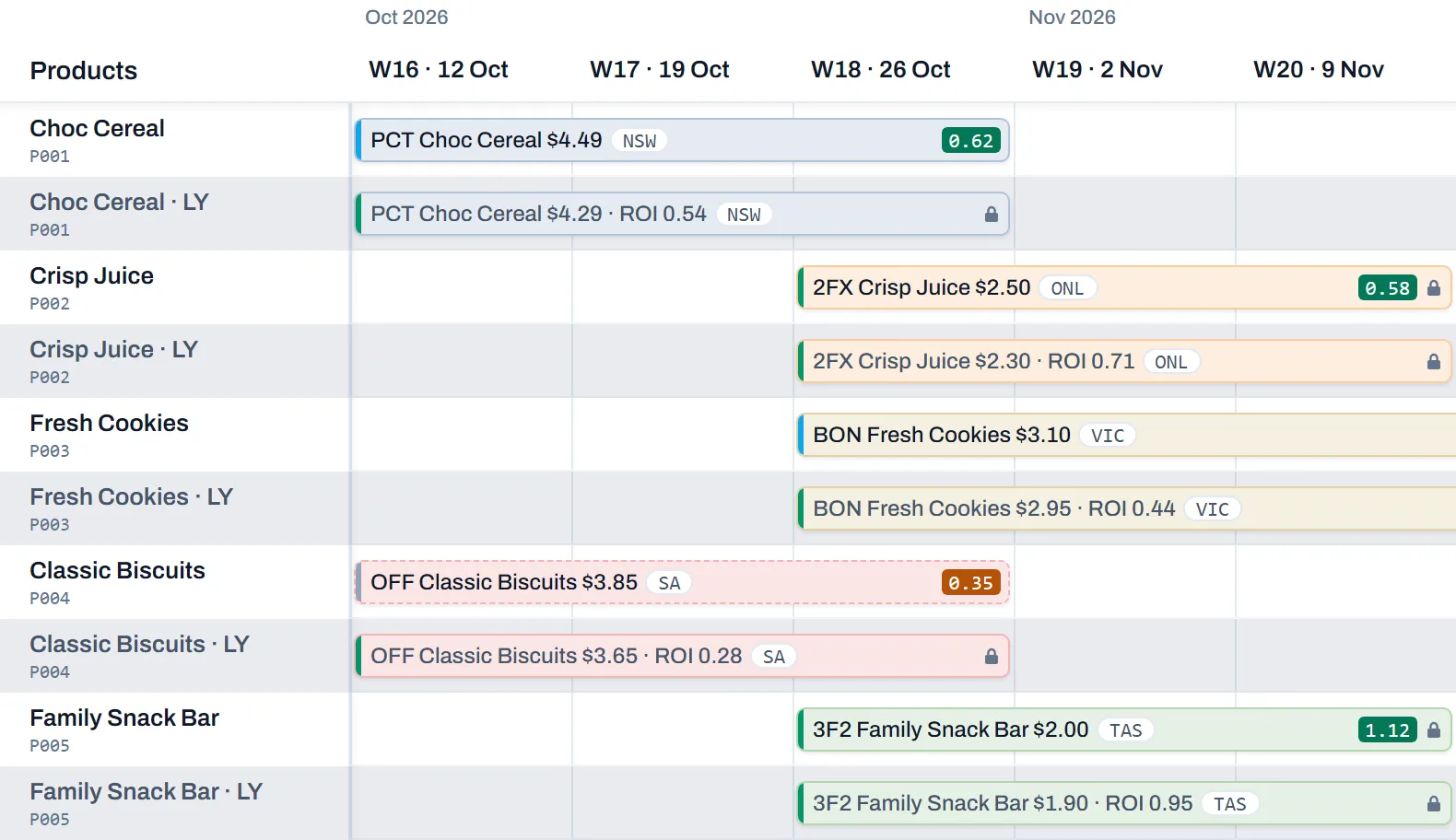
Turn on LY and each product that had promotions last year gets a tinted row beneath it, with last year’s promotions in the same fiscal weeks. Each one shows its price and ROI, and clicking it opens the promotion read-only, so you can plan this year with last year’s results in view.
Clashes, the trade plan and your spreadsheets
-
Clashes flagged, never silently blocked
Two promotions clash when they’re on the same product, their dates overlap and their scopes meet. Coles NSW and Coles QLD on one product don’t clash, but an all-retailer NSW promotion and a Coles NSW one do. Both bars are outlined, and Needs attention narrows the board to promotions with something to fix, such as a clash or incomplete economics.
-
The trade plan above the promotions
Campaigns, catalogues, in-store activity and key selling periods live on their own board and pin above the promotions on the same timeline. Link a promotion to the activation that funds it, and each activation shows how many promotions are linked, with their spend and volume.
-
Spreadsheets in and out
Bring in products, dated prices, weekly volume series and uplift grids from CSV, checked row by row before anything is saved. Export the visible grid or the full promotions file, which doubles as the actuals template: fill in what sold and import it back.
Bring your own product list
Book a 15-minute walkthrough and we’ll put your own categories, mechanics and retailers on the board. You’ll see real economics on your own products rather than a slide deck.
We’ll reply to set up a time, or you can email info@neuralpeak.io directly.